
Download Pc Audio Visualizer – audio visualizer, music visualizer, sound wave visualization, real-time audio display, PC audio tool, Windows audio app, visualizer for music
Overview
Pc Audio Visualizer is a lightweight utility designed to deliver real-time visual representations of audio signals generated by a Windows computer. The app functions as a sound wave visualization tool, transforming music, sound effects, and system audio into dynamic visual displays. Its primary purpose is to enhance the listening experience by adding a visual dimension to audio playback, making it particularly appealing to users who enjoy immersive multimedia environments. While not intended for professional audio analysis, it serves as a simple yet effective tool for casual users seeking a more engaging way to experience sound.
The application targets individuals who appreciate the fusion of audio and visual content—such as music enthusiasts, gamers, and desktop users who enjoy customizing their computing environment. It is especially suited for those who want a background visualizer that runs without consuming significant system resources. The developer, PC Audio Visualizer, has not provided detailed information about their background or other products, but the app’s long-standing presence since its release on December 18, 2012, suggests a stable, niche-focused offering. Real-world use cases include enhancing music sessions, visualizing game audio, or simply adding aesthetic appeal to a desktop setup.
Within the broader app ecosystem, Pc Audio Visualizer occupies a unique space as a minimalistic, no-frills tool. It does not compete with full-featured audio software but instead complements it by focusing on a single, well-executed function: visualizing sound. Its enduring relevance lies in its simplicity and efficiency, offering a low-barrier entry point for users who want to explore audio visualization without complexity or cost.
Key Features & Functionality
- Lightweight Application: Designed with minimal resource consumption in mind, Pc Audio Visualizer ensures it runs smoothly in the background without impacting system performance. This allows users to maintain high-quality audio playback while the visualizer operates continuously.
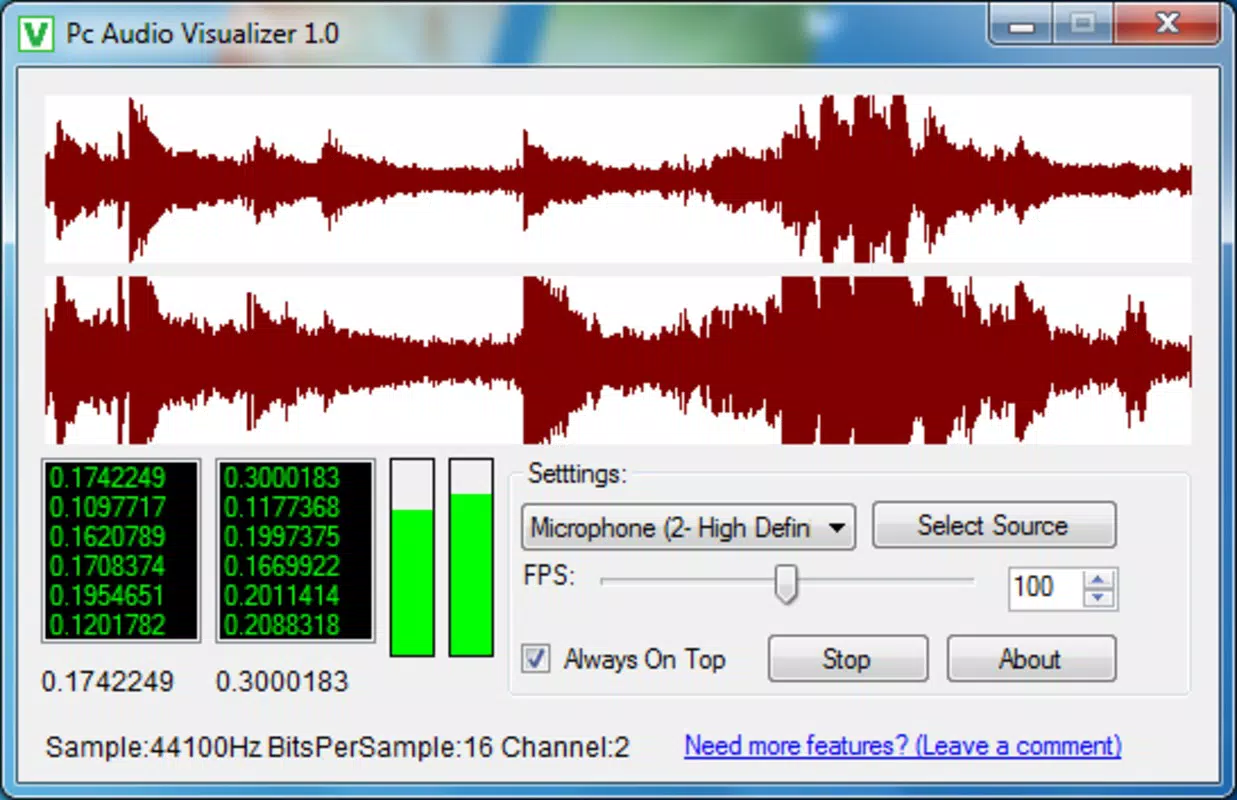
- Real-Time Visualization: The app captures audio output in real time and translates it into visual waveforms or patterns that respond instantly to changes in volume, frequency, and rhythm. This synchronization enhances the sensory experience during music or game sessions.
- Customizable Display Options: Users can adjust basic settings such as the type of visual display and frames per second (FPS), offering a degree of personalization despite the limited interface. These settings allow users to balance visual smoothness with system efficiency.
- Simplicity at Its Core: The interface is intentionally minimal, focusing on functionality without clutter. This makes it accessible to users of all technical levels, including those unfamiliar with audio software or visual tools.
- Fun Addition to Listening: By turning sound into visual motion, the app adds an entertaining layer to everyday audio consumption. It is ideal for users who enjoy ambient visuals or want to create a more immersive home or workspace atmosphere.
For example, a user listening to an electronic music track can observe the waveform pulsing in rhythm with the beat, creating a synchronized audio-visual experience. Similarly, during a video game session, the visualizer can reflect in-game sound effects, adding a dynamic visual layer to gameplay. The app’s straightforward design ensures that users can start visualizing audio within seconds of launching the program.
Interface, UX & Performance
The user interface of Pc Audio Visualizer is clean and uncluttered, focusing on functionality over aesthetics. It features a minimal window layout with essential controls, likely positioned to allow easy access without obstructing the screen. The visual output is displayed prominently, often in full-screen or floating mode, depending on user preference. Navigation is intuitive, requiring little to no learning curve, which supports its appeal to non-technical users.
Although the developer did not list formal performance metrics, the app’s file size of 1.5 MB and long-standing release history suggest a focus on efficiency. It is designed to operate with minimal CPU and memory usage, making it suitable for older or lower-spec Windows systems. The app maintains responsiveness across various device categories, including desktops and laptops, though specific compatibility details were not disclosed.
Stability appears to be a strength, given the app’s longevity and consistent functionality since 2012. Users can expect reliable operation during extended audio sessions without crashes or unexpected behavior. However, the lack of detailed technical specifications limits the ability to assess performance under high-load conditions or with multiple audio sources.
Platform Compatibility & Technical Requirements
Pc Audio Visualizer is available exclusively for the Windows platform. The app runs on Windows operating systems, though the specific version requirements were not listed by the developer. The file size is 1.5 MB, which indicates a compact and efficient application. Given its release date of December 18, 2012, it may be compatible with older versions of Windows, such as Windows 7 or 8, but modern versions like Windows 11 have not been confirmed.
The developer did not specify minimum OS requirements or hardware dependencies. As such, users should exercise caution when installing on newer systems, particularly those with updated security policies or driver restrictions. Compatibility information was not fully disclosed, so potential users are advised to test the app in a safe environment before full deployment.
Pros and Cons
Pros
- Extremely lightweight, with minimal impact on system performance
- Real-time audio visualization for an immersive listening experience
- Simple, intuitive interface suitable for all user levels
- Free to download and use, with no hidden costs
- Long-standing availability since 2012, indicating stability and reliability
Cons
- Limited customization options compared to modern visualizers
- No detailed technical specifications or system requirements provided
- Not available on platforms other than Windows
- Outdated release date raises questions about modern OS compatibility
- Limited support or updates since initial release
FAQ
Is Pc Audio Visualizer safe to download and install?
The app is free and available from its official source. However, users should ensure they download it from a trusted platform to avoid bundled software or malware.
Can I use Pc Audio Visualizer with any audio source?
Yes, the app captures audio output from any application playing sound on your Windows system, including music players, video players, and games.
Does Pc Audio Visualizer require internet access?
No, the app operates offline and does not require an internet connection to function.
Is the app compatible with Windows 10 or Windows 11?
The developer did not specify compatibility details. While it may work on newer systems, it is not officially confirmed.
How often is Pc Audio Visualizer updated?
There is no public information about update frequency. The last known release was in 2012, suggesting minimal or no active development.
Final Thoughts
Pc Audio Visualizer remains a niche yet valuable tool for users seeking a simple, free way to visualize sound on Windows. Its minimal design, lightweight performance, and real-time synchronization make it ideal for enhancing music and game audio experiences without complexity. While it lacks modern features and update support, its enduring functionality and zero cost offer significant value for users who prioritize simplicity and efficiency.
Those who enjoy ambient visuals, want to add flair to their desktop, or simply appreciate the interplay between sound and motion will find this app a satisfying addition. It is not a replacement for advanced audio software, but it excels in its singular purpose: transforming sound into a visual spectacle.
Download Pc Audio Visualizer now


